Home Charging

Smart home EV charging that fits how you live, drive, and use energy.

From daily driveway charging to solar-aware charging and tariff strategies, PlugStream helps households choose the right charger format and keep the whole setup simple to live with.

Read the latest launch update in our PlugStream 7 family blog post.

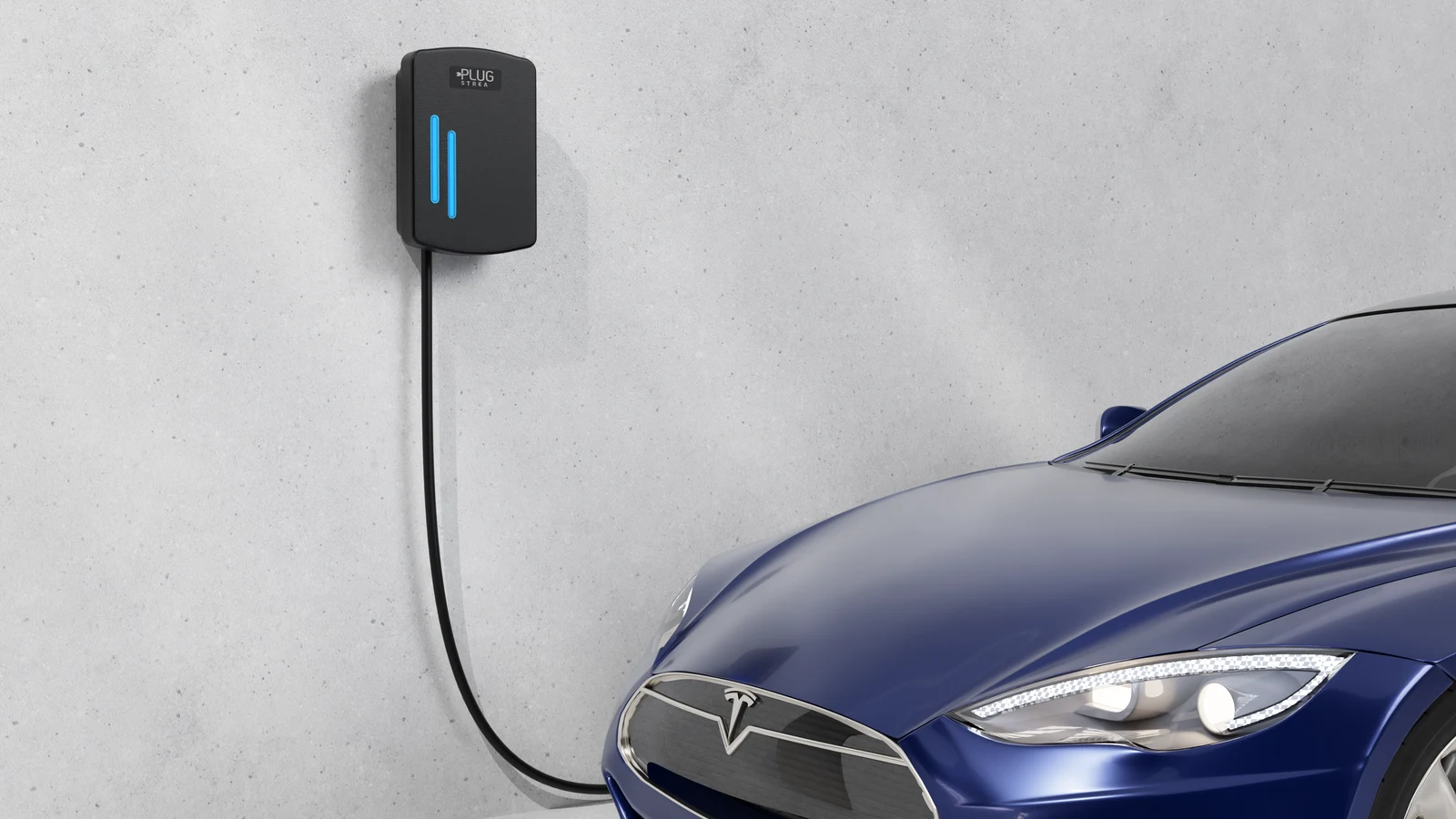
PlugStream home EV charger installed beside a parked car

What Matters At Home

A home charging setup should work with the property, not fight it.

PlugStream home charging is designed around daily habits, household energy use, installation practicality, and the flexibility drivers need as vehicles and routines change.

Choose the hardware that fits your routine

PlugStream 7S suits homes that want cable flexibility, while PlugStream 7T keeps the lead ready for quick everyday charging. The PlugStream 22 family is available where three-phase supply allows faster charging.

Charge around your tariff and your solar

Use scheduling, tariff-aware charging, and solar-aware behaviour to line charging up with your energy strategy instead of treating every session the same.

Plan the energy and network route early

Use PlugStream Connect where Wi-Fi or Ethernet is not dependable, and specify PlugStream Flow when the home needs wireless CT placement, solar context or a clearer energy view.

Home site issues

Solve the practical issues around the charger.

A good home charging setup is not only the charger on the wall. It also covers how the charger gets online, where the energy measurements are taken and how the customer sees solar, storage and EV load in the app.

The charger is not near the best CT location

Use PlugStream Flow to measure from the right point in the installation, add wireless CT placement and give the customer a clearer view of grid, solar, storage and EV load.

Solve with Flow

Wi-Fi will not reliably reach the charger

Use PlugStream Connect when Wi-Fi coverage is weak, Ethernet is not practical or the homeowner cannot provide dependable router access at the charger.

Solve with 4G

The 4G route needs managed data

Add PlugStream Connect Data with PlugStream Connect so the SIM/data route is part of the quote instead of a loose customer afterthought.

Review data route

Choose Your Charger

Three clear routes for home charging

Start with how the charger will be used each day, then choose the product that best matches the bay, the cable preference, and the available supply.

PlugStream 7S

Socketed 7.4kW charging for households that want flexibility between vehicles, cables, or shared-use bays.

View product

PlugStream 7T

Tethered 7.4kW charging for drivers who want the cable ready every time they arrive home.

View product

PlugStream 22 Family

Higher-power charging for homes with three-phase supply, starting with the socketed PlugStream 22S.

View product

Installation Journey

What a good home charging rollout looks like

The right home charger decision usually comes down to a small number of practical steps. PlugStream keeps those decisions clear for both installers and homeowners.

Step 1

Assess the parking location, the household supply, and whether the bay is dedicated or shared.

Step 2

Choose the right product format: 7S for flexibility, 7T for convenience, or the PlugStream 22 family for higher-demand sites.

Step 3

Commission the charger with the right connectivity path: Wi-Fi, Ethernet or PlugStream Connect 4G where coverage or router access is a risk.

Step 4

Add PlugStream Flow where the home needs wireless CT placement, solar and storage visibility, or a richer energy view in the PlugStream app.

Need help choosing between 7S and 7T?

If the bay is shared or the cable may change, start with PlugStream 7S. If one driver uses the same home bay every day, PlugStream 7T usually delivers the quickest charging routine.

Compare the PlugStream 7 family

FAQ

Home charging questions

Helpful answers for homeowners narrowing down the right PlugStream setup.

Which PlugStream charger is best for most homes?

For most single-phase homes, PlugStream 7S or PlugStream 7T will be the best fit. The right choice depends on whether you prefer a socketed or tethered cable format.

Can PlugStream work with smart tariffs?

Yes. PlugStream is designed to support scheduled charging and tariff-aware behaviour so drivers can make better use of lower-cost charging periods where available.

What if I add solar or another EV later?

PlugStream is designed for long-term flexibility. PlugStream Flow adds extra CT coverage, wireless CT placement and energy context for homes that need solar, storage or richer load-management visibility.

What if Wi-Fi is weak near the charger?

If Wi-Fi or Ethernet is not reliable at the charger location, specify PlugStream Connect as the 4G route and choose PlugStream Connect Data with the quote request.

Do I need a tethered or socketed charger?

Choose PlugStream 7T if one driver uses the same bay every day and wants speed of use. Choose PlugStream 7S if the bay may serve more than one vehicle or if cable flexibility matters.